

拿下抖音小姐姐,我写了个口红色号识别器!
对于广大“钢铁直男”的程序员来说,送什么礼物给女朋友一直是个世纪难题。
图片来自 Pexels
其实哄女朋友开心最深的套路就是花式送口红,就问谁抵挡得住啊啊啊啊......
“没有什么问题是一支口红解决不了的,如果有,那就两支。”于是,直男们纷纷开始各种买口红、送口红……?
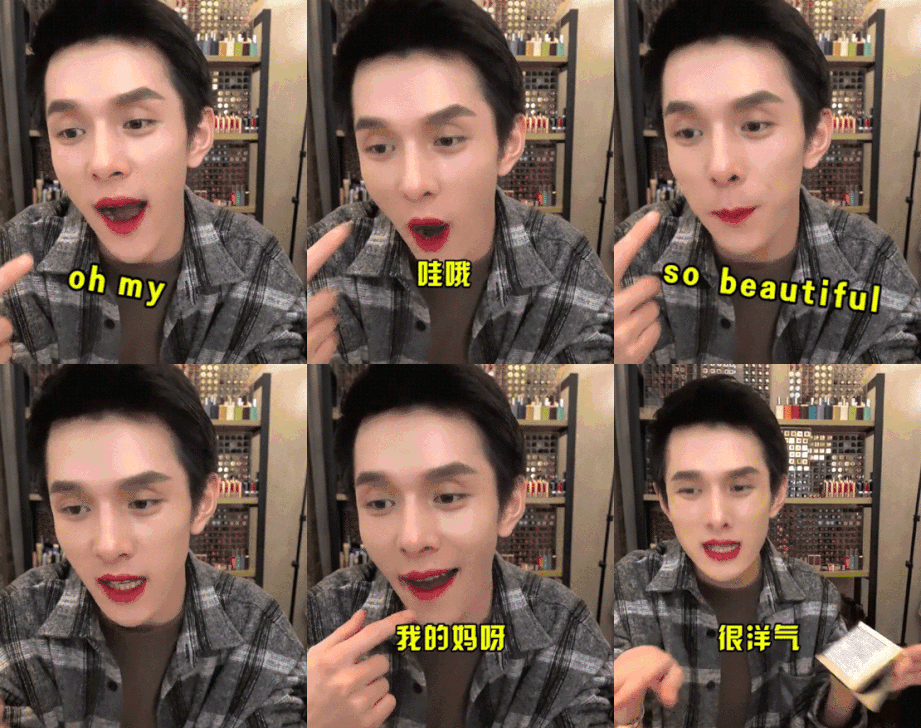
但是,口红色号千千万,选对了牌子才成功了一半。
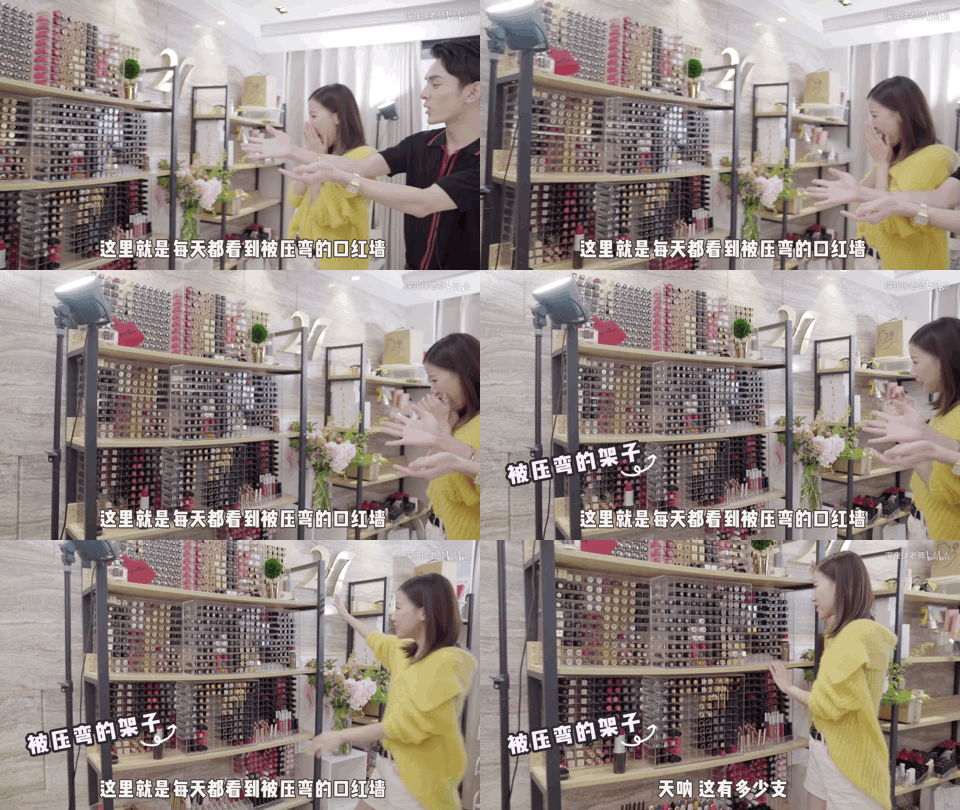
那么,对于直男来说,怎么才能搞清楚如此多的口红色号呢?
我耗费一毫米发际线,琢磨了一下,做出了一个口红色号识别器,希望能帮大家在关键时刻把深刻的革命友谊再升华一下。
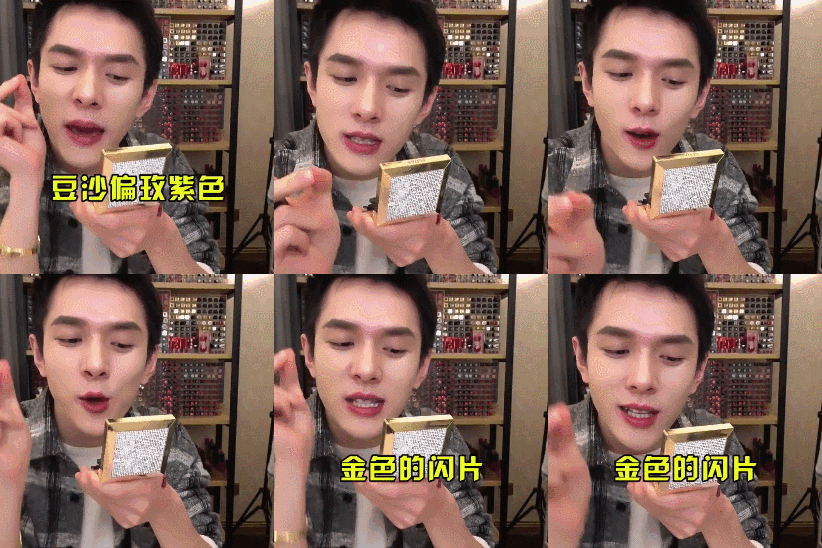
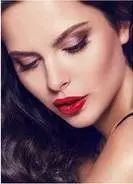
先来看看效果。让我们假设,小姐姐发来了一张美妆博主的美照,并暗示你,“人家也喜欢这个颜色。”
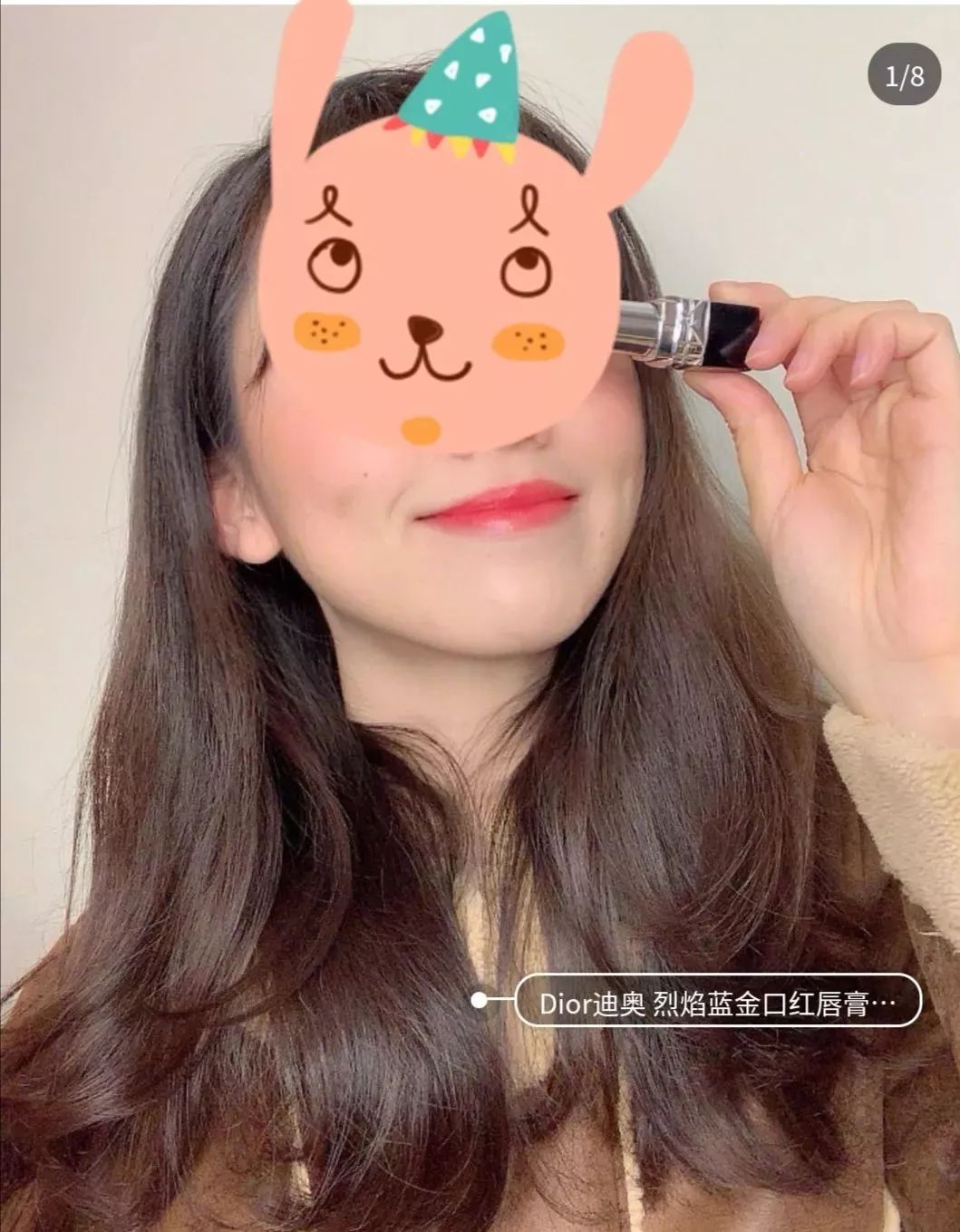
图片来自网络

好啦,废话不多说,马上开始教学时间!
来自?Github?的口红色号宇宙
要想识别口红色号,先得让机器知道到底都有哪些颜色。

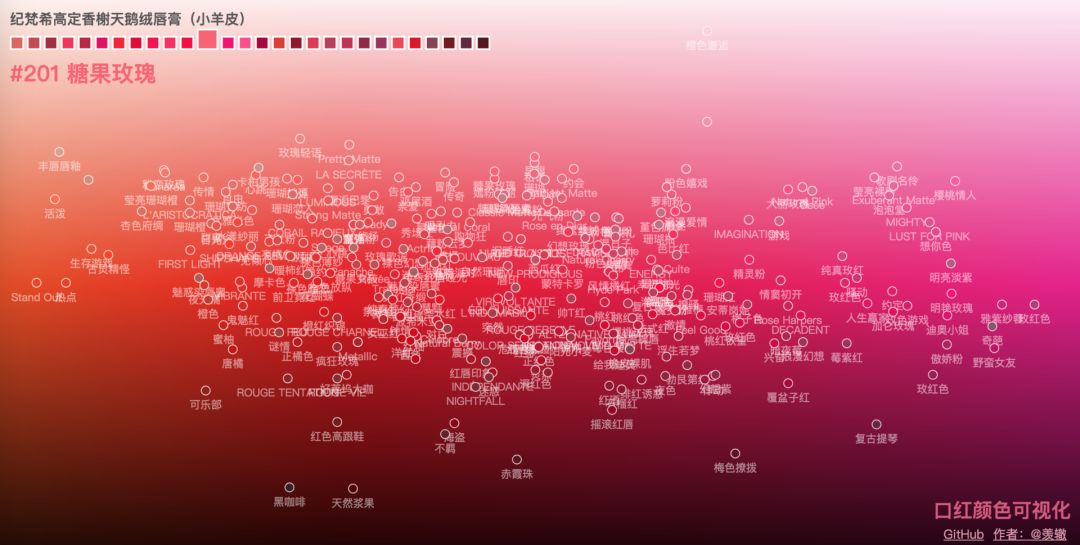
还好,在万能的 Github 上找到了一个宝藏数据库“口红颜色可视化”,这个数据库堪比口红的色号宇宙,不仅囊括了当前最主流品牌的各种系列色号,还很良心的在色盘上排列了出来。
这个数据集是一个嵌套的字典数据结构,存为 json 串的形式,里面记录了每个口红品牌系列下不同口红色号的颜色 id、名称、和 16 进制颜色值。
直!男!救!星!有木有!
https://github.com/Ovilia/lipstick
傻傻分不清的我对 5 个品牌的不同系列做了一下统计和色号录入,于是,剩下的就交给计算机啦。
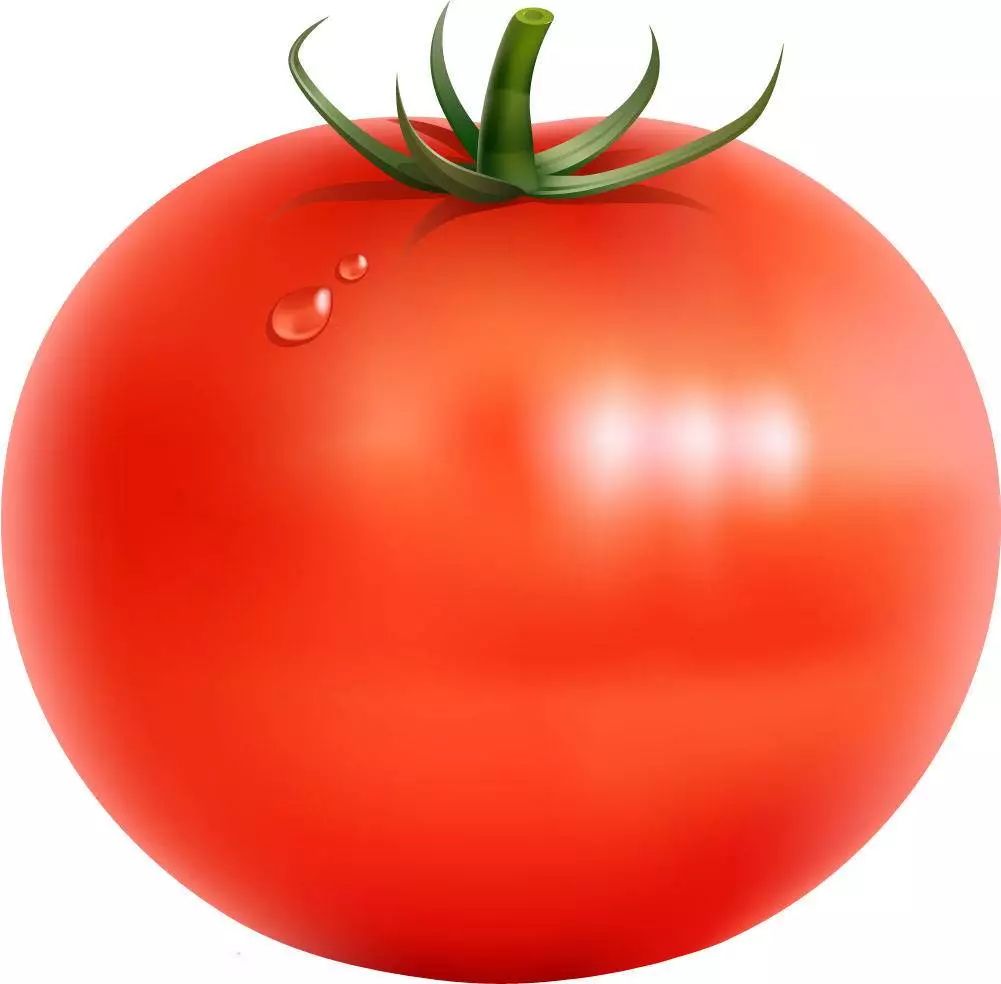
先用番茄做个实验?
先用番茄做个实验?
既然有了如此完备的色号数据库,那么文摘菌就有了一个讨巧的方法:要想找到合适的色号,可以直接截取颜色,然后在数据库中进行比对。
这个方法非常好操作,在上唇色之前,我们不如先拿别的红色物品来练手。

import?colorsys
import?PIL.Image?as?Image

def?get_dominant_color(image):
????max_score?=?0.0001
????dominant_color?=?None
????for?count,(r,g,b)?in?image.getcolors(image.size[0]*image.size[1]):
????????#?转为HSV标准
????????saturation?=?colorsys.rgb_to_hsv(r/255.0,?g/255.0,?b/255.0)[1]
????????y?=?min(abs(r*2104+g*4130+b*802+4096+131072)>>13,235)
????????y?=?(y-16.0)/(235-16)

????????#忽略高亮色
????????if?y?>?0.9:
????????????continue
????????score?=?(saturation+0.1)*count
????????if?score?>?max_score:
????????????max_score?=?score
????????????dominant_color?=?(r,g,b)
????return?dominant_color
import?os
import?getcolor
from?os.path?import?join?as?pjoin
from?scipy?import?misc

def?load_color(color_dir,list):?
????count?=?0
????for?dir?in?os.listdir(color_dir):??
????????img_dir?=?pjoin(color_dir,?dir)??
????????image?=?getcolor.Image.open(img_dir)
????????image?=?image.convert('RGB')
????????get=getcolor.get_dominant_color(image)
????????list.append(get)
????????count?=?count+1
????????#print(person_dir)
????#print(count)
????return?count

def?Mean_color(count,list):
?????Mean_R=Mean_G=Mean_B=0
?????for?i?in?range(count):
????????tuple=list[i]
????????Mean_R+=tuple[0]
????????Mean_G+=tuple[1]
????????Mean_B+=tuple[2]
?????MeanC=((int)(Mean_R/count),(int)(Mean_G/count),(int)(Mean_B/count))
?????return?Me
番茄的颜色提取到了,那么和什么做比对呢?
当然是口红的数据,文摘菌这儿用到了 5 个品牌,分别是圣罗兰、香奈儿可可小姐、迪奥、美宝莲、纪梵希,共 17 个系列,271 个口红色号。
数据集是一个嵌套的字典数据结构,存为 json 串的形式,里面记录了每个口红品牌系列下不同口红色号的颜色 id、名称、和 16 进制颜色值。
{"brands":[{"name":"圣罗兰","series":
[{"name":"莹亮纯魅唇膏","lipsticks":
[{"color":"#D62352","id":"49","name":"撩骚"},
{"color":"#DC4B41","id":"14","name":"一见倾心"},
{"color":"#B22146","id":"05","name":"浮生若梦"},
数据集中存储的 RGB 颜色是 16 进制的字符串形式,需要将其转换成 RGB 值,比较两个颜色相近与否。
实际上是比较 RGB 三个分量维度上的误差,最小的口红输出对应的品牌、系列、色号和 id。
import?json
import?getcolor
import?numpy?as?np
import?lipcolor

#filename?=?'temp.txt'
##write?the?temp?data?to?file##
def?WtoFile(filename,RGB_temp):
????num=len(RGB_temp)
????with?open(filename,'w')?as?f:?
???????for?i?in?range(num):
???????????s?=?str(RGB_temp[i]).replace('[','').replace(']','')
???????????f.write(s)
???????????f.write("n")

#operate?the?data?#
##save?the?brand&series&color?id&color?name?to?sum_list##
##covert?the?color?#D62352?to?RGB_array##
##caculate?the?RGB?difference?to?RGB_temp?and?write?the?value?to?file##
def?data_operate():
????with?open('lipstick.json',?'r',?encoding='utf-8')?as?f:
??????ret_dic?=?json.load(f)
??????#print(ret_dic['brands'])
??????#print(type(ret_dic))?#?
??????#print(ret_dic['brands'][0]['name'])?
??????b_num=len(ret_dic['brands'])
??????#print(b_num)#brands?number

??????s_list=[]
??????#series?brands#
??????for?i?in?range(len(ret_dic['brands'])):
??????????s_num=len(ret_dic['brands'][i]['series'])
??????????s_list.append(s_num)
??????????#print("{0}?has?{1}?series".format((ret_dic['brands'][i]['name']),(s_list[i])))


??????#the?lipstick?color?of?every?brands?every?series#
??????#the?first?loop?calculate?the?total?color?numbers
??????sum=0
??????for?b1?in?range(b_num):
??????????for?s1?in?range(s_list[b1]):
??????????????brand_name=ret_dic['brands'][b1]['name']
??????????????lip_name=ret_dic['brands'][b1]['series'][s1]['name']
??????????????color_num=len(ret_dic['brands'][b1]['series'][s1]['lipsticks'])
??????????????sum+=color_num#calculate?the?total?color?numbers

??????#the?second?loop?save?the?message?to?a?list#
??????sum_list=np.zeros((sum,4),?dtype=(str,8))
??????value_array=np.zeros((sum,6),?dtype=int)
??????i=0????
??????for?b2?in?range(b_num):
??????????for?s2?in?range(s_list[b2]):
??????????????brand_name=ret_dic['brands'][b2]['name']
??????????????#print(type(brand_name))
??????????????lip_name=ret_dic['brands'][b2]['series'][s2]['name']
??????????????color_num=len(ret_dic['brands'][b2]['series'][s2]['lipsticks'])
??????????????for?c?in?range(color_num):
????????????????????color_value=ret_dic['brands'][b2]['series'][s2]['lipsticks'][c]['color']
????????????????????color_name=ret_dic['brands'][b2]['series'][s2]['lipsticks'][c]['name']
????????????????????color_id=ret_dic['brands'][b2]['series'][s2]['lipsticks'][c]['id']
????????????????????#print("{0} series {1} has {2} colors,color {3}:{4}".format(brand_name,lip_name,color_num,c+1,color_name))
????????????????????sum_list[i][0]=brand_name
????????????????????sum_list[i][1]=lip_name
????????????????????sum_list[i][2]=color_id
????????????????????sum_list[i][3]=color_name
????????????????????#value_array[i]=value_array[i][1]
????????????????????#convert?"#D62352"?to?[13??6??2??3??5??2]#
????????????????????for?l?in?range(6):
????????????????????????temp=color_value[l+1]
????????????????????????if(temp>='A'and?temp< ='F'):
???????????????????????????temp1=ord(temp)-ord('A')+10
????????????????????????else:
???????????????????????????temp1=ord(temp)-ord('0')
????????????????????????value_array[i][l]=temp1
????????????????????i+=1


????#the?third?loop?covert?value_array?to?RGB_array#
??????RGB_array=np.zeros((sum,3),?dtype=int)
??????for?i?in?range(sum):
??????????RGB_array[i][0]=value_array[i][0]*16+value_array[i][1]
??????????RGB_array[i][1]=value_array[i][2]*16+value_array[i][3]
??????????RGB_array[i][2]=value_array[i][4]*16+value_array[i][5]

??????#calculate?the?similar?and?save?to?RGB_temp
??????#RGB_temp=np.zeros((sum,1),?dtype=int)
??????RGB_temp=np.zeros((sum,1),?dtype=float)
??????for?i?in?range(sum):
??????????R=RGB_array[i][0]
??????????G=RGB_array[i][1]
??????????B=RGB_array[i][2]
??????????RGB_temp[i]=abs(get[0]-R)+abs(get[1]*3/4-G)+abs(get[2]-B)
??????RGB_temp.tolist();#covert?array?to?list
??????#print(RGB_temp)
??????filename="temp.txt"
??????WtoFile(filename,RGB_temp)
??????#sort?the?RGB_temp#
??????result=sorted(range(len(RGB_temp)),?key=lambda?k:?RGB_temp[k])
??????#print(result)
??????#output?the?three?max?prob?of?the?lipsticks#
??????print("The?first?three?possible?lipstick?brand?and?color?id&name?are?as?follows:")
??????for?i?in?range(3):
??????????idex=result[i]
??????????print(sum_list[idex])
??????print("The?first?three?possible?lipstick?brand?RGB?value?are?as?follows:")
??????for?i?in?range(3):
??????????idex=result[i]
??????????R=RGB_array[idex][0]
??????????G=RGB_array[idex][1]
??????????B=RGB_array[idex][2]
??????????tuple=(R,G,B)
??????????print(tuple)


if?__name__?==?'__main__':
?????#image?=?getcolor.Image.open(inputpath)
?????#image?=?image.convert('RGB')
?????#get=getcolor.get_dominant_color(image)#tuple?#get=(231,?213,?211)
?????list=[]
?????color_dir="output"
?????count=lipcolor.load_color(color_dir,list)
?????get=lipcolor.Mean_color(count,list)
?????print("the?extracted?RGB?value?of?the?color?is?{0}".format(get))
?????#operate?the?data#
?????data_operat
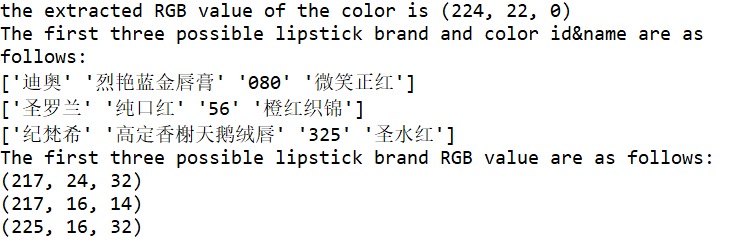
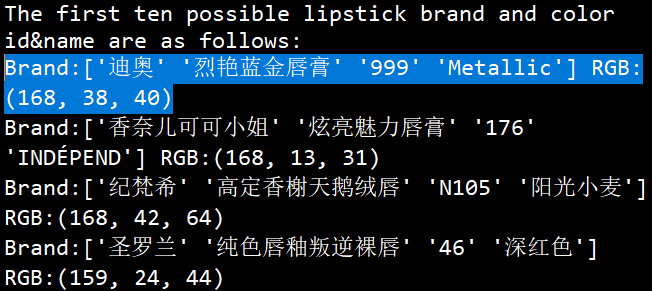
可以看到最有可能的三个口红品牌色号的 RGB 值与番茄的 RGB 值是非常接近的。



不过,这也正说明了,刚刚的提取&对比方法可行!
既然可以识别番茄的颜色,那么,可以识别人像中的口红色号吗?
进入正题!人像口红色号识别
接下来,我们需要做的是输入一张人像图片,可以自动识别其中的嘴唇区域,并提取出嘴唇区域中的一部分做为颜色提取的源图像。
这里就要用到 CV 的人脸识别了,还好 Dlib 库又帮助我们减轻一大部分的工作量。
Dlib?中有自带的 68 个人脸的识别器,可以得到人脸部位包括眉毛、眼睛、鼻梁、面部轮廓和嘴唇区域的具体点的位置,到这儿,我以为很轻松就可以截到嘴唇区域了,结果有点尴尬.........
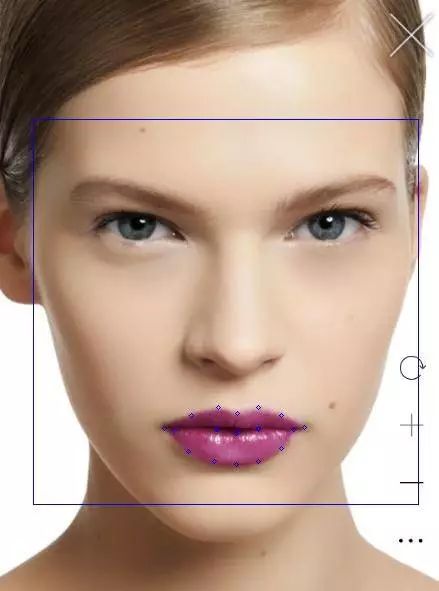
我们首先找到了一张小姐姐的照片:

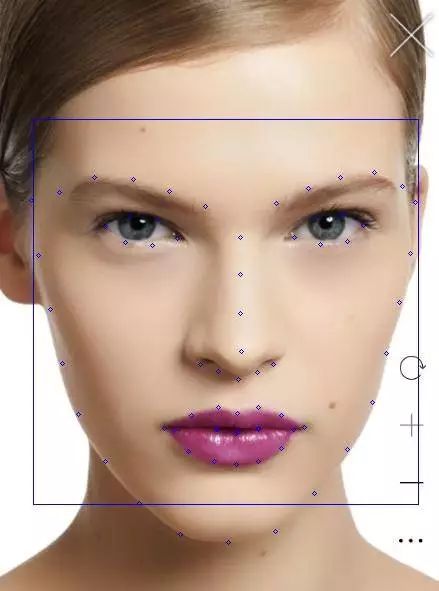
圣罗兰官网 #842C71?口红
标记的 68 个人脸检测点如上图所示,而嘴唇部位是从第 49 个标记点开始的(数组的话,下标是 48)。
为了尽可能的截取到均匀成色的嘴唇片段,刚开始是想从第 50?个标记点对角线截取到第 56 个标记点,而这不可避免的会截取到上下嘴唇之间的缝隙,这儿的阴影也会影响后续的颜色提取准确度。
 ?
?
import?numpy?as?np?
import?cv2
import?dlib
from?PIL?import?Image

def?crop(source,pos):

??????x1=pos[2][0]
??????y1=pos[2][1]
??????x2=pos[1][0]
??????y2=pos[1][1]
??????d=abs(x2-x1)
??????region?=?source[(int)(y1-d*0.75):y2,x1:x2]
??????#?save?the?image
??????cv2.imwrite("output/Mouth1.jpg",?region)

??????x1=pos[1][0]
??????y1=pos[1][1]
??????x2=pos[0][0]
??????y2=pos[0][1]
??????d=abs(x1-x2)
??????region?=?source[y1-d:y2,x1:x2]
??????#?save?the?image
??????cv2.imwrite("output/Mouth2.jpg",?region)


def?detect_mouth(img,pos):
????????gray?=?cv2.cvtColor(img,?cv2.COLOR_BGR2GRAY)
????????gray?=?cv2.equalizeHist(gray)
????????detector?=?dlib.get_frontal_face_detector()
????????#use?the?predictor
????????predictor?=?dlib.shape_predictor('shape_predictor_68_face_landmarks.dat')
????????dets?=?detector(img,?1)???
????????print("Number?of?faces?detected:?{}".format(len(dets)))
????????for?a?in?dets:????
???????????cv2.rectangle(img,(a.left(),a.top()),(a.right(),a.bottom()),(255,0,0))
????????#point_list=[]#save?the?mouth?point?to?point_list[]#
????????#Extract?68?feature?points?of?the?face?and?crop?the?lip?image#
????????for?index,?face?in?enumerate(dets):
???????????print('face?{};?left?{};?top?{};?right?{};?bottom?{}'.format(index,?face.left(),?face.top(),?face.right(),?face.bottom()))
???????????shape?=?predictor(gray,?face)
???????????for?i,?pt?in?enumerate(shape.parts()):
????????????#print('Part?{}:?{}'.format(i,?pt))
????????????#print(i)
?????????????pt_pos?=?(pt.x,?pt.y)
?????????????if?i>=48?and?i< =67:
????????????????cv2.circle(img,?pt_pos,?2,?(255,?0,?0),?1)
?????????????if?i>=56?and?i< =58:
????????????????#print(pt_pos)
????????????????pos[i-56][0]=pt.x
????????????????pos[i-56][1]=pt.y
?????????????#cv2.circle(img,?pt_pos,?2,?(255,?0,?0),?1)
????????return?img

if?__name__?==?"__main__":?
??????img?=?cv2.imread("test3.png")
??????#copy?the?input?image?for?the?later?crop#
??????img_clone?=?np.copy(img)
??????cv2.imwrite("input/source.jpg",img_clone)
??????#save?the?lip?position?to?pos?array#
??????pos=np.zeros((3,2),?dtype=int)
??????result=detect_mouth(img,pos)
??????cv2.imwrite("input/source2.jpg",result)
??????#crop?the?lip?areas#
??????source?=?cv2.imread("input/source.jpg")
??????crop(source,pos)
??????#?show?the?result
??????cv2.imshow('FaceDetect',result)
??????cv2.waitKey(0)?
??????cv2.destroyAllWindow
既然已经截取到嘴唇的小矩形图像了,接下来的工作就和前面一样了,在数据库中对比每个 RGB 值输出最小误差对应的口红信息,而这儿也有难到我。
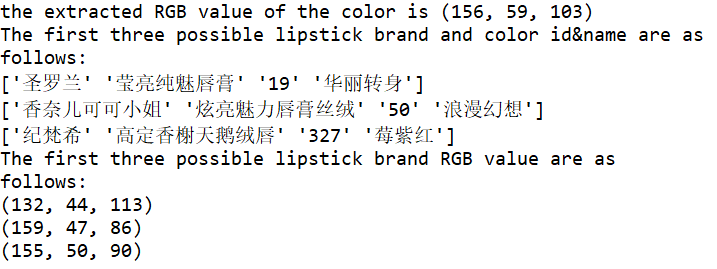
单纯的比对 RGB 分量对口红色号来说并不适用,有可能每个分量相差很小,而叠加起来的颜色和提取到的颜色并不相似,在颜色的比对上需要手动调参。
误差分析

 ?
?明显看到数据集存储的颜色和实际照片的颜色是有些许误差的,而在本文算法实现过程中,又不可避免的有以下误差:
嘴唇区域截取不可避免会截取到皮肤中的一部分颜色,虽然算法已经将那种可能降到最低。
颜色提取上,虽然截取多个嘴唇图片求平均值,但是本身的提取算法还是和实际值稍有偏差。
RGB?颜色相似度比对的算法也不够精确。
最最重要的是,照片必须是原图,而且光线要自然,加了滤镜的图是怎么也不可能识别出来的。
以上种种,使得让计算机快速高效地识别不同的口红色号还是有困难的,原来计算机有时候也会很直男。
实时人像口红色号预测
看到这儿,可能很多读者朋友想实时地试一下能不能让计算机判断自己的口红色号,这对于?OpenCV 这一强大的图形操作库来说,不是什么问题。

#coding=utf8
import?cv2
import?time
print('Press?Esc?to?exit')
imgWindow?=?cv2.namedWindow('FaceDetect',?cv2.WINDOW_NORMAL)
import?sys
import?os
import?dlib
import?glob
import?numpy
from?skimage?import?io
def?detect_face():
????capInput?=?cv2.VideoCapture(0)
????#nextCaptureTime?=?time.time()
????faces?=?[]
????feas?=?[]?
????if?not?capInput.isOpened():?print('Capture?failed?because?of?camera')
????while?1:
????????ret,?img?=?capInput.read()
????????gray?=?cv2.cvtColor(img,?cv2.COLOR_BGR2GRAY)
????????gray?=?cv2.equalizeHist(gray)
????????time=0
????????eTime?=?time.time()?+?0.1
????????detector?=?dlib.get_frontal_face_detector()
????????predictor?=?dlib.shape_predictor('shape_predictor_68_face_landmarks.dat')
????????dets?=?detector(gray,?1)??
????????print("Number?of?faces?detected:?{}".format(len(dets)))
????????for?a?in?dets:????
???????????cv2.rectangle(img,(a.left(),a.top()),(a.right(),a.bottom()),(255,0,0))
????????for?index,?face?in?enumerate(dets):
???????????print('face?{};?left?{};?top?{};?right?{};?bottom?{}'.format(index,?face.left(),?face.top(),?face.right(),?face.bottom()))
???????????shape?=?predictor(gray,?face)???
???????????for?i,?pt?in?enumerate(shape.parts()):
????????????#print('Part?{}:?{}'.format(i,?pt))
?????????????pt_pos?=?(pt.x,?pt.y)
?????????????cv2.circle(img,?pt_pos,?2,?(255,?0,?0),?1)
????????cv2.imshow('FaceDetect',img)
????????if?cv2.waitKey(1)?&?0xFF?==?27:?break
????capInput.release()
????cv2.destroyAllWindows()
if?__name__?==?"__main__":?
????detect_face()
好啦,佳期如梦,双星良夜,在一个充满爱意的日子里,定位好女神常用的口红色号,和那个她来场华丽的邂逅吧!
福利来啦
作者:宁静
编辑:陶家龙、孙淑娟
出处:转载自微信公众号大数据文摘?(ID:BigDataDigest)

精彩文章推荐:
关注公众号:拾黑(shiheibook)了解更多
[广告]赞助链接:
四季很好,只要有你,文娱排行榜:https://www.yaopaiming.com/
让资讯触达的更精准有趣:https://www.0xu.cn/
 51CTO技术栈
 关注网络尖刀微信公众号
随时掌握互联网精彩







- 1 习近平将发表二〇二六年新年贺词 7904141
- 2 2026年国补政策来了 7808738
- 3 东部战区:开火!开火!全部命中! 7712893
- 4 2026年这些民生政策将惠及百姓 7616985
- 5 小学食堂米线过期2.5小时被罚5万 7519709
- 6 解放军喊话驱离台军 原声曝光 7428214
- 7 为博流量直播踩烈士陵墓?绝不姑息 7327605
- 8 每月最高800元!多地发放养老消费券 7238391
- 9 数字人民币升级 1月1日起将计付利息 7141831
- 10 2026年1月1日起 一批新规将施行 7040675
