

如何在鸿蒙系统中移植Paho-MQTT实现MQTT协议
MQTT 是当前最主流的物联网通信协议,需要物联网云平台,例如华为云、阿里云、移动 OneNET 都支持 MQTT。而 Hi3861则是一款专为 IoT 应用场景打造的芯片。

图片来自 Pexels
本节主要讲如何在鸿蒙系统中通过移植第 3 方软件包 Paho-MQTT 去实现 MQTT 协议功能,最后会给出测试验证。为后续的物联网项目打好基础。
友情预告,本节内容较多,源码也贴出来了,大家最好先看一遍,然后再操作一次。
MQTT 介绍
MQTT 全称为 Message Queuing Telemetry
Transport(消息队列遥测传输)是一种基于发布/订阅范式的二进制“轻量级”消息协议,由 IBM 公司发布。针对于网络受限和嵌入式设备而设计的一种数据传输协议。
MQTT 最大优点在于,可以以极少的代码和有限的带宽,为连接远程设备提供实时可靠的消息服务。
作为一种低开销、低带宽占用的即时通讯协议,使其在物联网、小型设备、移动应用等方面有较广泛的应用。

更多 MQTT 协议的介绍见上篇文章:MQTT 协议开发入门。
移植 Paho-MQTT 软件包

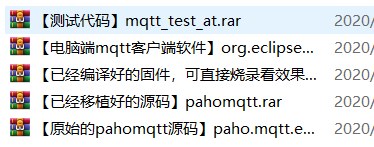
下载 paho mqtt 软件包,添加到鸿蒙代码中
paho mqtt-c 是基于 C 语言实现的 MQTT 客户端,非常适合用在嵌入式设备上。
https://github.com/eclipse/paho.mqtt.embedded-c
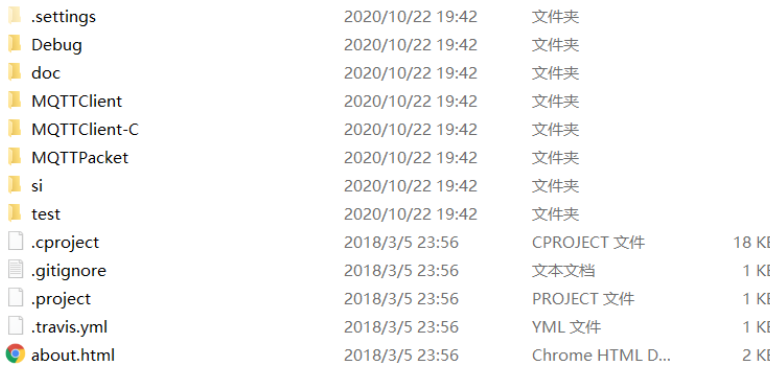
我们在鸿蒙系统源码的 third_party 文件夹下创建一个 pahomqtt 文件夹,然后把解压后的所有文件都拷贝到 pahomqtt 文件夹下。
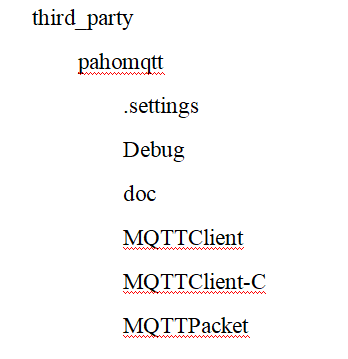
下一步,我们在 pahomqtt 文件夹下面新建 BUILD.gn 文件,用来构建编译。
#?Copyright?(c)?2020?Huawei?Device?Co.,?Ltd.
#?Licensed?under?the?Apache?License,?Version?2.0?(the?"License");
#?you?may?not?use?this?file?except?in?compliance?with?the?License.
#?You?may?obtain?a?copy?of?the?License?at
#
#?????http://www.apache.org/licenses/LICENSE-2.0
#
#?Unless?required?by?applicable?law?or?agreed?to?in?writing,?software
#?distributed?under?the?License?is?distributed?on?an?"AS?IS"?BASIS,
#?WITHOUT?WARRANTIES?OR?CONDITIONS?OF?ANY?KIND,?either?express?or?implied.
#?See?the?License?for?the?specific?language?governing?permissions?and
#?limitations?under?the?License.

import("//build/lite/config/component/lite_component.gni")
import("//build/lite/ndk/ndk.gni")

config("pahomqtt_config")?{
????include_dirs?=?[
????????"MQTTPacket/src",
????????"MQTTPacket/samples",
????????"//vendor/hisi/hi3861/hi3861/third_party/lwip_sack/include",
????????"//kernel/liteos_m/components/cmsis/2.0",
????]
}


pahomqtt_sources?=?[
"MQTTPacket/samples/transport.c",
"MQTTPacket/src/MQTTConnectClient.c",
"MQTTPacket/src/MQTTConnectServer.c",
"MQTTPacket/src/MQTTDeserializePublish.c",
"MQTTPacket/src/MQTTFormat.c",
"MQTTPacket/src/MQTTPacket.c",
"MQTTPacket/src/MQTTSerializePublish.c",
"MQTTPacket/src/MQTTSubscribeClient.c",
"MQTTPacket/src/MQTTSubscribeServer.c",
"MQTTPacket/src/MQTTUnsubscribeClient.c",
"MQTTPacket/src/MQTTUnsubscribeServer.c",
]


lite_library("pahomqtt_static")?{
????target_type?=?"static_library"
????sources?=?pahomqtt_sources
????public_configs?=?[?":pahomqtt_config"?]
}

lite_library("pahomqtt_shared")?{
????target_type?=?"shared_library"
????sources?=?pahomqtt_sources
????public_configs?=?[?":pahomqtt_config"?]
}

ndk_lib("pahomqtt_ndk")?{
????if?(board_name?!=?"hi3861v100")?{
????????lib_extension?=?".so"
????????deps?=?[
????????????":pahomqtt_shared"
????????]
????}?else?{
????????deps?=?[
????????????":pahomqtt_static"
????????]
????}
????head_files?=?[
????????"//third_party/pahomqtt"
????]
}
让 hi3861编译的时候,编译 paho mqtt软件包
打开 vendor\hisi\hi3861\hi3861\BUILD.gn 文件。
在 lite_component("sdk") 中增加 "//third_party/pahomqtt:pahomqtt_static"。
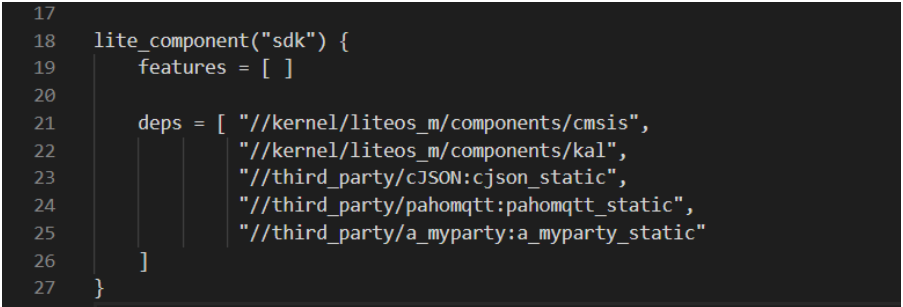
完成以上修改后,就可以开始编译了,然而很不幸的...你会发现好多编译报错。
不过没事,我们来一个一个解决。
移植,修改编译报错
打开 third_party\pahomqtt\MQTTPacket\samples\transport.c 文件,这个文件也是我们主要移植的文件,我们需要实现 socket 相关的操作,包括发送、接收数据。
其实移植就 3 步:
①首先我们导入几个头文件:
#include?"lwip/ip_addr.h"
#include?"lwip/netifapi.h"

#include?"lwip/sockets.h"
int?transport_sendPacketBuffer(int?sock,?unsigned?char*?buf,?int?buflen)
{
????int?rc?=?0;
????rc?=?send(sock,?buf,?buflen,?0);
????return?rc;
}
int?transport_close(int?sock)
{
int?rc;

????rc?=?shutdown(sock,?SHUT_WR);
????rc?=?recv(sock,?NULL,?(size_t)0,?0);
????rc?=?lwip_close(sock);

????return?rc;
}
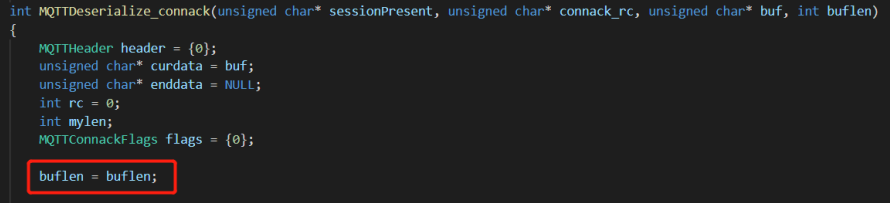
④修改完 transport.c 文件后,大家编译的时候估计会遇到很多编译错误,都是某个局部变量未使用那种,大家可以修改就行。
编写测试代码
测试代码比较好写。主要是 3 个文件,内容我都贴出来了:

①BUILD.gn 文件内容
#?Copyright?(c)?2020?Huawei?Device?Co.,?Ltd.
#?Licensed?under?the?Apache?License,?Version?2.0?(the?"License");
#?you?may?not?use?this?file?except?in?compliance?with?the?License.
#?You?may?obtain?a?copy?of?the?License?at
#
#?????http://www.apache.org/licenses/LICENSE-2.0
#
#?Unless?required?by?applicable?law?or?agreed?to?in?writing,?software
#?distributed?under?the?License?is?distributed?on?an?"AS?IS"?BASIS,
#?WITHOUT?WARRANTIES?OR?CONDITIONS?OF?ANY?KIND,?either?express?or?implied.
#?See?the?License?for?the?specific?language?governing?permissions?and
#?limitations?under?the?License.

static_library("mqtt_test_at")?{
????sources?=?[
????????"mqtt_test.c",
????????"at_entry.c"
????]

????include_dirs?=?[
????????"//utils/native/lite/include",
????????"//kernel/liteos_m/components/cmsis/2.0",
????????"//base/iot_hardware/interfaces/kits/wifiiot_lite",
????????"//vendor/hisi/hi3861/hi3861/third_party/lwip_sack/include",
????????"//foundation/communication/interfaces/kits/wifi_lite/wifiservice",
????????"//third_party/pahomqtt/MQTTPacket/src",
????????"//third_party/pahomqtt/MQTTPacket/samples",
????????"//vendor\hisi\hi3861\hi3861\components\at\src"
????]
}
②at_entry.c 文件主要是注册了一个 AT 指令,后面大家可以使用? AT+MQTTTEST 指令来测试 MQTT 功能
#include?<stdio.h>

#include?<unistd.h>

#include?"ohos_init.h"
#include?"cmsis_os2.h"

#include?<unistd.h>

#include?<at.h>
#include?<hi_at.h>

#include?"hi_wifi_api.h"


#include?"mqtt_test.h"


void?mqtt_test_thread(void?*?argv)
{
????argv?=?argv;

????mqtt_test();

}

hi_u32?at_exe_mqtt_test_cmd(void)
{
????osThreadAttr_t?attr;

????attr.name?=?"wifi_config_thread";
????attr.attr_bits?=?0U;
????attr.cb_mem?=?NULL;
????attr.cb_size?=?0U;
????attr.stack_mem?=?NULL;
????attr.stack_size?=?4096;
????attr.priority?=?36;

????if?(osThreadNew((osThreadFunc_t)mqtt_test_thread,?NULL,?&attr)?==?NULL)?{
????????printf("[LedExample]?Falied?to?create?LedTask!\n");
????}

????AT_RESPONSE_OK;
????return?HI_ERR_SUCCESS;
}

const?at_cmd_func?g_at_mqtt_func_tbl[]?=?{
????{"+MQTTTEST",?9,?HI_NULL,?HI_NULL,?HI_NULL,?(at_call_back_func)at_exe_mqtt_test_cmd},
};

void?AtExampleEntry(void)
{
????hi_at_register_cmd(g_at_mqtt_func_tbl,?sizeof(g_at_mqtt_func_tbl)/sizeof(g_at_mqtt_func_tbl[0]));
}

SYS_RUN(AtExampleEntry);
③mqtt_test.c 文件则是编写了一个简单的 MQTT 测试代码,具体代码讲解,后面会重新开一篇
#include?<stdio.h>

#include?<unistd.h>

#include?"ohos_init.h"
#include?"cmsis_os2.h"

#include?<unistd.h>
#include?"hi_wifi_api.h"
//#include?"wifi_sta.h"
#include?"lwip/ip_addr.h"
#include?"lwip/netifapi.h"

#include?"lwip/sockets.h"

#include?"MQTTPacket.h"
#include?"transport.h"

int?toStop?=?0;

int?mqtt_connect(void)
{
????MQTTPacket_connectData?data?=?MQTTPacket_connectData_initializer;
????int?rc?=?0;
????int?mysock?=?0;
????unsigned?char?buf[200];
????int?buflen?=?sizeof(buf);
????int?msgid?=?1;
????MQTTString?topicString?=?MQTTString_initializer;
????int?req_qos?=?0;
????char*?payload?=?"hello?HarmonyOS";
????int?payloadlen?=?strlen(payload);
????int?len?=?0;
????char?*host?=?"106.13.62.194";
????//char?*host?=?"192.168.1.102";
????int?port?=?1883;


????mysock?=?transport_open(host,?port);
????if(mysock?<?0)
????????return?mysock;

????printf("Sending?to?hostname?%s?port?%d\n",?host,?port);

????data.clientID.cstring?=?"me";
????data.keepAliveInterval?=?20;
????data.cleansession?=?1;
????data.username.cstring?=?"testuser";
????data.password.cstring?=?"testpassword";

????len?=?MQTTSerialize_connect(buf,?buflen,?&data);
????rc?=?transport_sendPacketBuffer(mysock,?buf,?len);

????/*?wait?for?connack?*/
????if?(MQTTPacket_read(buf,?buflen,?transport_getdata)?==?CONNACK)
????{
????????unsigned?char?sessionPresent,?connack_rc;

????????if?(MQTTDeserialize_connack(&sessionPresent,?&connack_rc,?buf,?buflen)?!=?1?||?connack_rc?!=?0)
????????{
????????????printf("Unable?to?connect,?return?code?%d\n",?connack_rc);
????????????goto?exit;
????????}
????}
????else
????????goto?exit;

????/*?subscribe?*/
????topicString.cstring?=?"substopic";
????len?=?MQTTSerialize_subscribe(buf,?buflen,?0,?msgid,?1,?&topicString,?&req_qos);
????rc?=?transport_sendPacketBuffer(mysock,?buf,?len);
????if?(MQTTPacket_read(buf,?buflen,?transport_getdata)?==?SUBACK)??/*?wait?for?suback?*/
????{
????????unsigned?short?submsgid;
????????int?subcount;
????????int?granted_qos;

????????rc?=?MQTTDeserialize_suback(&submsgid,?1,?&subcount,?&granted_qos,?buf,?buflen);
????????if?(granted_qos?!=?0)
????????{
????????????printf("granted?qos?!=?0,?%d\n",?granted_qos);
????????????goto?exit;
????????}
????}
????else
????????goto?exit;

????/*?loop?getting?msgs?on?subscribed?topic?*/
????topicString.cstring?=?"pubtopic";
????while?(!toStop)
????{
????????/*?transport_getdata()?has?a?built-in?1?second?timeout,
????????your?mileage?will?vary?*/
????????if?(MQTTPacket_read(buf,?buflen,?transport_getdata)?==?PUBLISH)
????????{
????????????unsigned?char?dup;
????????????int?qos;
????????????unsigned?char?retained;
????????????unsigned?short?msgid;
????????????int?payloadlen_in;
????????????unsigned?char*?payload_in;
????????????int?rc;
????????????MQTTString?receivedTopic;
????????????rc?=?MQTTDeserialize_publish(&dup,?&qos,?&retained,?&msgid,?&receivedTopic,
????????????????????&payload_in,?&payloadlen_in,?buf,?buflen);
????????????printf("message?arrived?%.*s\n",?payloadlen_in,?payload_in);

????????????rc?=?rc;
????????}

????????printf("publishing?reading\n");
????????len?=?MQTTSerialize_publish(buf,?buflen,?0,?0,?0,?0,?topicString,?(unsigned?char*)payload,?payloadlen);
????????rc?=?transport_sendPacketBuffer(mysock,?buf,?len);
????}

????printf("disconnecting\n");
????len?=?MQTTSerialize_disconnect(buf,?buflen);
????rc?=?transport_sendPacketBuffer(mysock,?buf,?len);
exit:
????transport_close(mysock);

????rc?=?rc;

????return?0;
}


void?mqtt_test(void)
{
????mqtt_connect();
}
#ifndef?__MQTT_TEST_H__
#define?__MQTT_TEST_H__

void?mqtt_test(void);

#endif?/*?__MQTT_TEST_H__?*/
到这里就完成了代码部分,可以开始编译了。
MQTT 实验
这里我们需要先下载一个 Windows 电脑端的 MQTT 客户端,这样我们就可以用电脑订阅开发板的 MQTT 主题信息了。
https://repo.eclipse.org/content/repositories/paho-releases/org/eclipse/paho/org.eclipse.paho.ui.app/1.1.1/

弄完后打开软件,按图操作:

操作完后,我们把编译后程序烧写到开发板,输入如下串口指令,让开发板连接上网络,因为 MQTT 功能需要网络支持。
输入如下串口指令:
AT+STARTSTA???????????????????????????????????????????????????????开启STA模式

AT+CONN="12-203",,2,"07686582488"???????????????连接到路由器,注意wifi热点名和密码用自己的

AT+DHCP=wlan0,1??????????????????????????????????????????????获取IP地址

AT+IFCFG?????????????????????????????????????????????????????????????打印查看IP地址
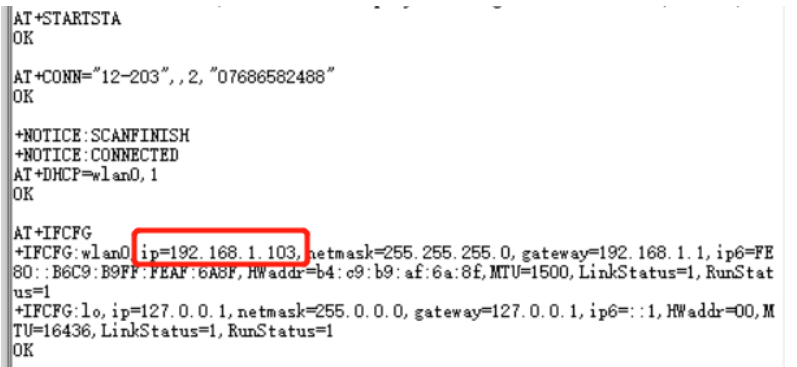
成功连接上路由器后,请确保路由器是可以上网的。然后我们输入我们的? MQTT 测试的 AT 指令:AT+MQTTTEST。


总结
这一次的内容比较多,其中总结起来就 4 步:
添加第三方软件包 paho mqtt,关于如何添加第3方软件包,我之前有一篇文章已经讲了。可以参考:如何往鸿蒙系统源码中添加第三方软件包。
移植 paho mqtt。
编写测试代码,这里我们用的是注册 AT 指令的方式,方便大家使用AT指令测试。
测试,这里用电脑装 mqtt 客户端程序,去验证。
关注公众号:拾黑(shiheibook)了解更多 [广告]赞助链接:
四季很好,只要有你,文娱排行榜:https://www.yaopaiming.com/
让资讯触达的更精准有趣:https://www.0xu.cn/
 51CTO技术栈
 关注网络尖刀微信公众号
随时掌握互联网精彩







- 1 习近平将发表二〇二六年新年贺词 7904141
- 2 2026年国补政策来了 7808738
- 3 东部战区:开火!开火!全部命中! 7712893
- 4 2026年这些民生政策将惠及百姓 7616985
- 5 小学食堂米线过期2.5小时被罚5万 7519709
- 6 解放军喊话驱离台军 原声曝光 7428214
- 7 为博流量直播踩烈士陵墓?绝不姑息 7327605
- 8 每月最高800元!多地发放养老消费券 7238391
- 9 数字人民币升级 1月1日起将计付利息 7141831
- 10 2026年1月1日起 一批新规将施行 7040675
