

Pandas 数据分析,你不能不知道的技能

作者 | 老表
来源 |?简说Python
一、前言 二、本文概要 三、pandas merge by 修罗闪空 3.1 merge函数用途 3.2 merge函数的具体参数 3.3 merge函数的应用 四、pandas apply by pluto、乔瞧 4.1 pandas apply by pluto 4.2 pandas apply by 乔瞧 pandas pivot_table by 石墨锡
一、前言
二、本文概要
pandas merge by 修罗闪空
pandas apply by pluto、乔瞧
pandas pivot_table by 石墨锡
三、pandas merge by 修罗闪空
3.1 merge函数用途
3.2 merge函数的具体参数
用法:
DataFrame1.merge(DataFrame2,?
how=‘inner’,?on=None,?left_on=None,?
right_on=None,?left_index=False,?
right_index=False,?sort=False,?suffixes=(‘_x’,?‘_y’))
参数说明: how:默认为inner,可设为inner/outer/left/right;
on:根据某个字段进行连接,必须存在于两个DateFrame中(若未同时存在,则需要分别使用left_on和right_on来设置);
left_on:左连接,以DataFrame1中用作连接键的列;
right_on:右连接,以DataFrame2中用作连接键的列;
left_index:将DataFrame1行索引用作连接键;
right_index:将DataFrame2行索引用作连接键;
sort:根据连接键对合并后的数据进行排列,默认为True;
suffixes:对两个数据集中出现的重复列,新数据集中加上后缀_x,_y进行区别。
3.3 merge函数的应用
3.3.1 merge一般应用
import?pandas?as?pd

#?定义资料集并打印出来
left?=?pd.DataFrame({'key1':?['K0',?'K0',?'K1',?'K2'],
?????????????????????'key2':?['K0',?'K1',?'K0',?'K1'],
?????????????????????'A':?['A0',?'A1',?'A2',?'A3'],
?????????????????????'B':?['B0',?'B1',?'B2',?'B3']})
right?=?pd.DataFrame({'key1':?['K0',?'K1',?'K1',?'K2'],
??????????????????????'key2':?['K0',?'K0',?'K0',?'K0'],
??????????????????????'C':?['C0',?'C1',?'C2',?'C3'],
??????????????????????'D':?['D0',?'D1',?'D2',?'D3']})

print(left)
print('------------')
print(right)
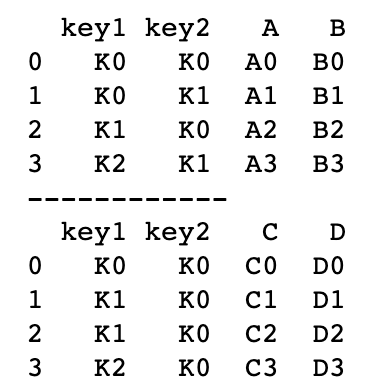
单个字段连接
#?依据key1?column合并,并打印
res?=?pd.merge(left,?right,?on='key1')
print(res)
多字段连接
#?依据key1和key2?column进行合并,并打印出四种结果['left',?'right','outer',?'inner']
res?=?pd.merge(left,?right,?on=['key1',?'key2'],?how='inner')
print(res)

res?=?pd.merge(left,?right,?on=['key1',?'key2'],?how='outer')
print(res)

res?=?pd.merge(left,?right,?on=['key1',?'key2'],?how='left')?#?以left为主进行合并
print(res)

res?=?pd.merge(left,?right,?on=['key1',?'key2'],?how='right')?#?以right为主进行合并
print(res)
3.3.2 merge进阶应用
indicator 设置合并列数据来源
#?indicator?设置合并列数据来源
df1?=?pd.DataFrame({'coll':?[0,?1],?'col_left':?['a',?'b']})
df2?=?pd.DataFrame({'coll':?[1,?2,?2],?'col_right':?[2,?2,?2]})
print(df1)
print('---------')
print(df2)

#?依据coll进行合并,并启用indicator=True,最后打印
res?=?pd.merge(df1,?df2,?on='coll',?how='outer',?indicator=True)
print(res)
'''
left_only?表示数据来自左表
right_only?表示数据来自右表
both?表示两个表中都有,也就是匹配上的
'''

#?自定义indicator?column的名称并打印出
res?=?pd.merge(df1,?df2,?on='coll',?how='outer',?indicator='indicator_column')
print(res)
依据index合并
#?依据index合并
#?定义数据集并打印出
left?=?pd.DataFrame({'A':?['A0',?'A1',?'A2'],
?????????????????????'B':?['B0',?'B1',?'B2']},
???????????????????index?=?['K0',?'K1',?'K2'])
right?=?pd.DataFrame({'C':?['C0',?'C2',?'C3'],
?????????????????????'D':?['D0',?'D2',?'D3']},
???????????????????index?=?['K0',?'K2',?'K3'])
print(left)
print('---------')
print(right)
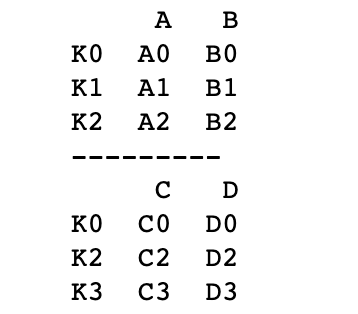
#?依据左右数据集的index进行合并,how='outer',并打印
res?=?pd.merge(left,?right,?left_index=True,?right_index=True,?how='outer')
print(res)

#?依据左右数据集的index进行合并,how='inner',并打印
res?=?pd.merge(left,?right,?left_index=True,?right_index=True,?how='inner')
print(res)
解决overlapping的问题
#?解决overlapping的问题
#?定义资料集
boys?=?pd.DataFrame({'k':?['K0',?'K1',?'K2'],?'age':?[1,?2,?3]})
girls?=?pd.DataFrame({'k':?['K0',?'K1',?'K3'],?'age':?[4,?5,?6]})
print(boys)
print('---------')
print(girls)

#?使用suffixes解决overlapping的问题
#?比如将上面两个合并时,age重复了,则可通过suffixes设置,以此保证不重复,不同名(默认会在重名列名后加_x?_y)
res?=?pd.merge(boys,?girls,?on='k',?suffixes=['_boy',?'_girl'],?how='inner')
print(res)
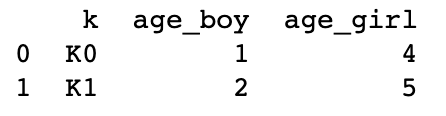
四、pandas apply by pluto、乔瞧
4.1 pandas apply by pluto
DataFrame.apply(func,?
axis=0,?broadcast=False,?
raw=False,?reduce=None,?args=(),?**kwds)
import?pandas?as?pd

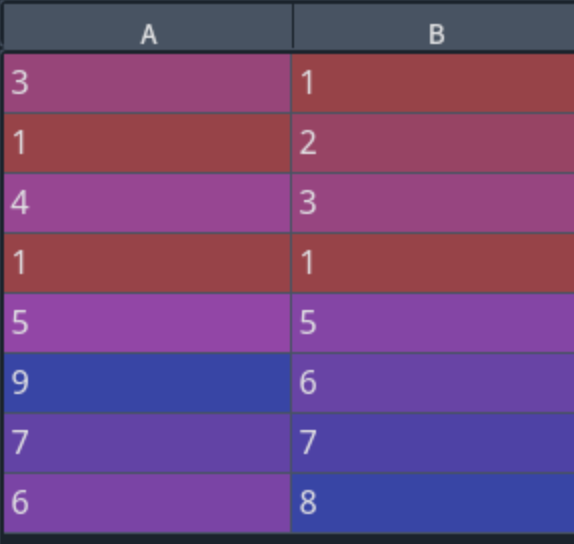
df?=?pd.DataFrame({'A':[3,1,4,1,5,9,None,6],
??????????????'B':[1,2,3,None,5,6,7,8]})

d?=?df.apply(lambda?x:?x.fillna(x.mean()))
print(df)
print('----------')
print(d)
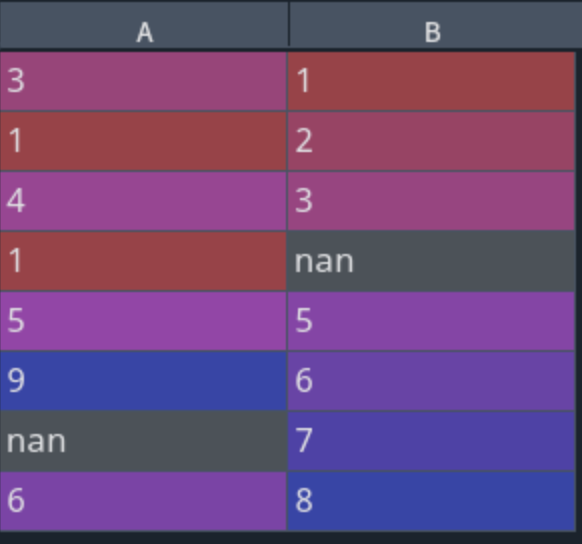

import?pandas?as?pd

df?=?pd.DataFrame({'A':[3,1,4,1,5,9,None,6],
??????????????'B':[1,2,3,None,5,6,7,8]})

def?add(x):
????return?x+1

d?=?df.apply(add,?axis=1)
print(df)
print('----------')
print(d)

4.2 pandas apply by 乔瞧
import?pandas?as?pd
df?=?pd.DataFrame({'语文':[93,80,85,76,58],
???????????????????'数学':[87,99,95,85,70],
???????????????????'英语':[80,85,97,65,88]},?
??????????????????index=['孙悟空','猪八戒','沙和尚','唐僧','白龙马']
?????????????????)
print(df)
print('-----------')
df1?=?df.loc[df['语文'].apply(lambda?x:85<=x<100)]?\
????.loc[df['英语'].apply(lambda?x:85<=x<100)]?\
????.loc[df['数学'].apply(lambda?x:85<=x<100)]
print(df1)

pandas pivot_table by 石墨锡
DataFrame.pivot_table(self,?values=None,?index=None,?columns=None,?aggfunc='mean',?fill_value=None,?margins=False,?dropna=True,?margins_name='All',?observed=False)
import?numpy?as?np
import?pandas?as?pd
df?=?pd.DataFrame({'brand':?['苹果',?'三星',?'华为',?'OPPO',?'诺基亚',?'小米'],
????????????????????'country':?['美国','韩国','中国','中国','美国','中国'],
???????????????????'system':?['OS',?'Android',?'Harmony',?'Android',?'Android',?'Android'],
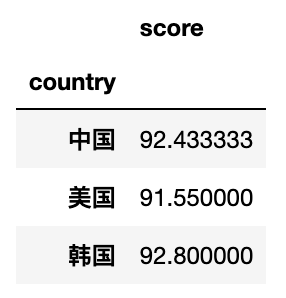
???????????????????'score':?[94.7,??92.8,?96.8,?89.3,?88.4,?91.2]})
df

#?按country进行分组,默认计算数值列的均值
df.pivot_table(index='country')
#?按country进行分组,除了计算score均值,另外计算每个国家出现的品牌个数(不重复)
df.pivot_table(index='country',aggfunc={'score':np.mean,'brand':lambda?x?:?len(x.unique())})

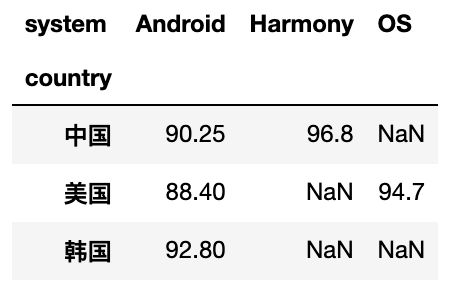
#?按country进行分组,system作为列名,score作为表中的值(重复的取均值),取对应的数据生成新的表
df.pivot_table(index='country',columns='system',values='score')
#?统计各个国家手机的最高分?最低分??平均分,空值填充为零
df.pivot_table(index='country',columns='system',values='score',aggfunc=[max,min,np.mean],fill_value=0)

往期回顾 分享
点收藏
点点赞
点在看



关注公众号:拾黑(shiheibook)了解更多
[广告]赞助链接:
四季很好,只要有你,文娱排行榜:https://www.yaopaiming.com/
让资讯触达的更精准有趣:https://www.0xu.cn/
 AI100
AI100
 关注网络尖刀微信公众号
随时掌握互联网精彩
赞助链接






排名
热点
搜索指数
- 1 习近平将发表二〇二六年新年贺词 7904141
- 2 2026年国补政策来了 7808738
- 3 东部战区:开火!开火!全部命中! 7712893
- 4 2026年这些民生政策将惠及百姓 7616985
- 5 小学食堂米线过期2.5小时被罚5万 7519709
- 6 解放军喊话驱离台军 原声曝光 7428214
- 7 为博流量直播踩烈士陵墓?绝不姑息 7327605
- 8 每月最高800元!多地发放养老消费券 7238391
- 9 数字人民币升级 1月1日起将计付利息 7141831
- 10 2026年1月1日起 一批新规将施行 7040675
